Antigravity Agent 实战指南:最佳实践与配置架构
深度解析 Antigravity Agent 的配置架构(规则、技能、工作流),打造高度自治的 AI 研发助手。
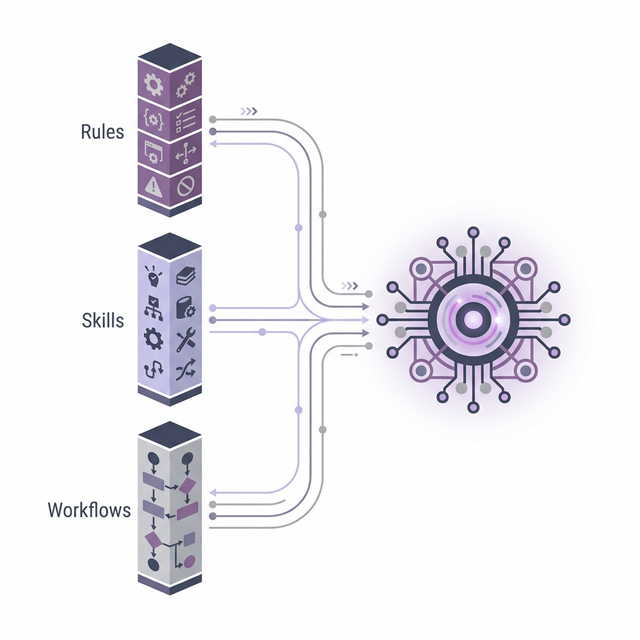
TL;DR: Antigravity Agent 正在推动 AI 研发助手从“静态补全”走向“动态自治”。本指南深度拆解了 Antigravity
.agent配置框架背后的“铁三角”系统:Rules (规则),Skills (技能) 和 Workflows (工作流)。文章提供了一套立等可用的架构生成器以及组织这些资源的最佳实践。
Antigravity Agent 代表了 AI 辅助研发的下一次进化。与被动的代码补全工具不同,Antigravity Agent 是自主的、具备上下文感知的、并且会使用工具的。为了发挥其最大潜力,你必须为它配置一套由 规则 (Rules)、技能 (Skills) 和 工作流 (Workflows) 构成的严密架构。
本指南将深入讲解构建强大 Development Agent 的最佳实践。
1. 配置铁三角 (The Trinity)
一个高效的 Antigravity 配置依赖于三个位于 .agent 目录下的核心组件。
📜 Rules (规则) (.agent/rules/*.md)
上下文与约束。Rules 提供持久记忆和行为准则,是 Agent 的“宪法”。
- 触发机制 (Triggers):
always_on: 全局规则(如架构模式、技术栈)。glob: 特定文件规则(如globs: {py,ts})。model_decision: 基于意图动态激活的角色(如“作为一个 DBA 专家”)。manual: 用户通过 @提及 显式激活(如@rule)。
- 最佳实践: 保持 Rule 专注。谨慎使用
always_on以避免污染上下文窗口 (Context Window)。将特定领域的任务交给model_decision角色。
🛠️ Skills (技能) (.agent/skills/*/SKILL.md)
能力扩展。Skills 定义了 Agent 能做什么。它们是封装了指令的可执行函数。
- 结构: 必须是一个包含
SKILL.md(指令文件)和可选脚本的文件夹。 - 最佳实践: 将团队的核心 CLI 知识移植到这里。不要只列出命令,要解释 何时 以及 如何 使用它们(例如“修改 Flask 代码后使用
npm run test:backend进行验证”)。对于涉及 UI 或浏览器自动化的项目,可以利用browser_subagent进行可视化调试和测试。
🔄 Workflows (工作流) (.agent/workflows/*.md)
标准流程。Workflows 是由 Slash 命令触发的、结构化的多步骤过程。
- 触发: 文件名决定命令(例如
debug.md->/debug)。 - 最佳实践: 将重复的、复杂的任务(如“新功能实现”或“根因分析”)定义为 Workflow。设定清晰的步骤:收集 (Gather) -> 计划 (Plan) -> 执行 (Execute) -> 验证 (Verify)。
2. 治理策略
关注点分离
- Rules 定义 “我是谁,我必须(不能)做什么”。
- Skills 定义 “我能使用什么工具”。
- Workflows 定义 “我该如何执行一个多步任务”。
限制与性能
- 文件限制: Rules 和 Workflows 严格限制在 12,000 字符以内。由简入繁,切勿长篇大论。
- 原子化设计: 如果 workflow 过大,将其拆分为更小的、可组合的模块。
3. Antigravity 配置生成器 (The Generator)
想要瞬间为一个新项目配置好 Antigravity?使用这个 Meta-Prompt。将它复制到你的 Antigravity 对话框中,它会自动分析你的项目并生成一套量身定制的 .agent 目录。
📋 复制此 Prompt
1
2
3
4
5
6
7
8
9
10
11
12
13
14
15
16
17
18
19
20
21
22
23
24
25
26
27
28
29
30
31
32
33
34
35
36
37
38
39
40
41
42
43
44
45
46
47
48
49
50
51
52
53
54
55
56
57
58
59
60
61
62
63
64
65
# System Prompt: Generate Antigravity Agent Configuration

You are an expert in configuring **Antigravity Agent Rules, Skills, and Workflows**. Your task is to analyze the current project structure and generate a complete, strictly compliant `.agent` directory configuration.

## 1. Core Concepts & Definitions

Strictly adhere to these definitions and constraints (Max 12,000 chars per Rule/Workflow file):

### A. Rules (`.agent/rules/*.md`)
**Purpose**: Manually or automatically activated constraints/personas.
**Triggers** (Must specify one in frontmatter):
- `always_on`: Always applied (Global context).
- `glob`: Applied when active file matches extensions (e.g., `globs: {ts,tsx}`).
- `model_decision`: Model decides based on description (e.g., "Act as a Database Expert").
- `manual`: User activates via `@rule`.

### B. Skills (`.agent/skills/<name>/SKILL.md`)
**Purpose**: Reusable packages of knowledge/commands.
**Structure**: Must be a folder containing a `SKILL.md` file.

### C. Workflows (`.agent/workflows/*.md`)
**Purpose**: Structured sequences of steps for repetitive tasks.
**Trigger**: Slash command (Filename determines trigger, e.g., `add-feature.md` -> `/add-feature`).
**Structure**: Title, Description, and numbered Steps.

## 2. Analysis Phase
- **Scan**: Read `README.md`, `package.json` (or equivalent).
- **Identify**: Tech stack, coding style, common tasks (debug, test, deploy).

## 3. Generation Phase
Generate the following files in `.agent/`. Use standard English.

### A. Rules
1.  **Project Core (`core.md`)**:
    -   *Trigger*: `always_on`
    -   *Content*: Arch patterns, tech stack, critical constraints.
2.  **Code Style (`style.md`)**:
    -   *Trigger*: `glob` (CRITICAL: Must specify extensions using `globs` key, e.g., `globs: {ts,tsx,py}`)
    -   *Content*: Naming conventions, specific syntax preferences.
3.  **Specialist Persona (`implementer.md`)**:
    -   *Trigger*: `model_decision` ("Act as...")
    -   *Content*: Persona for implementing code (e.g., "Minimal changes", "Verify with tests").

### B. Skills
1.  **Dev Toolkit (`.agent/skills/dev-toolkit/SKILL.md`)**:
    -   *Content*: CLI commands for Run, Test, Lint, Build, database access.

### C. Workflows
1.  **Feature Workflow (`.agent/workflows/add-feature.md`)**:
    -   *Trigger*: `/add-feature`
    -   *Steps*: Requirements -> Plan -> Implement -> Verify.
2.  **Debug Workflow (`.agent/workflows/debug.md`)**:
    -   *Trigger*: `/debug`
    -   *Steps*: Symptom -> Logs -> Root Cause -> Fix -> Verify.

## 4. Output Format
Return the content for each file using standard markdown code blocks, specifying the absolute path (e.g., `.agent/rules/core.md`).

---
**Example Frontmatter for Rule:**
```markdown
---
trigger: always_on
description: Core Project Instructions
---
Example Frontmatter for Glob Rule:
1
2
3
4
5
---
trigger: glob
description: Python Code Style
globs: {py}
---
Example Frontmatter for Workflow:
1
2
3
---
description: Interactive workflow for debugging
---
```
通过标准化 Agent 配置,你不仅是在配置工具,更是在将项目的“DNA”植入 AI,让每一次交互都基于深刻的上下文理解。