macOS App replacing existing signature
在 macOS 上替换应用签名以修复 Gatekeeper 与依赖库签名问题的实践步骤。
macOS App replacing existing signature
背景
日常使用中偶尔下载一些正版原来来测试用用,所以用了一些手段解决一些问题。 以下内容仅用于测试,建议大家购买正版软件使用。
开启
问题1
下载某个软件,然后打开后提示,“is damaged and can’t be opened. You should move it to the Trash.”
问题原因是啥呢?
This is actually a macOS Gatekeeper issue try these steps: To resolute Gatekeeper issues on macOS Sierra you might have to partially or completely disable Gatekeeper checks.
解决办法
1
2
3
4
5
6
Option I
For a certain application run in Terminal:
sudo xattr -rd com.apple.quarantine /Applications/[LockedApp].app
Option II
To disable checks globally run in Terminal:
sudo spctl --master-disable
解决之后,app 可以启动了。
问题2
如果正常启动后应该就没有这个问题了。 具体是:
1
2
3
4
5
6
7
8
9
10
11
Exception Type:        EXC_CRASH (SIGABRT)
Exception Codes:       0x0000000000000000, 0x0000000000000000
Exception Note:        EXC_CORPSE_NOTIFY

Termination Reason:    DYLD, [0x5] Code Signature

Application Specific Information:
dyld: launch, loading dependent libraries

Dyld Error Message: *****
程序crash了。
从提示的问题可以看到是动态库的签名问题了。需要的就是解决签名,按照macOS 的上的办法,将该app重新签名。
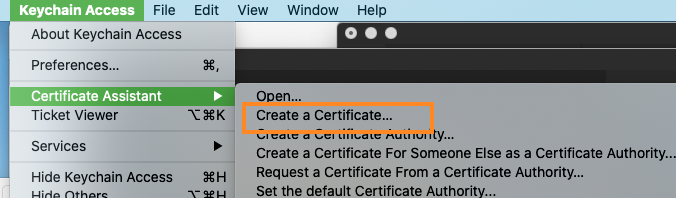
打开Keychain access 工具。
建立一个证书Create a certificate.
设置证书的名称, Setting the certificate name.
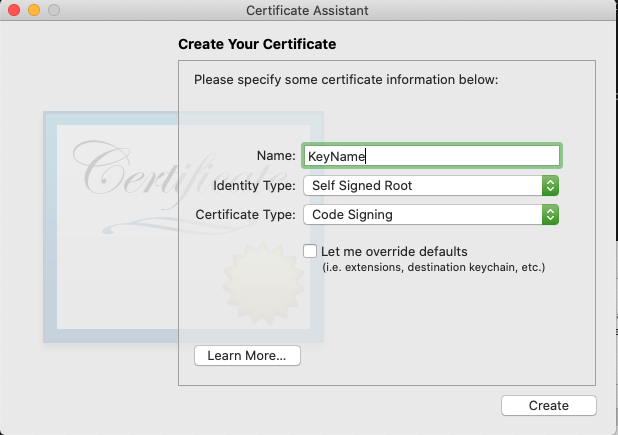
Create.
打开bash 命令, 如下。
1
2
3

sudo codesign -f -s certificateName /Applications/yourApp.app
至此完成。
可以常常打开app 了。
This post is licensed under CC BY 4.0 by the author.